Fewer manual entries
Repeat a cut line into a pattern, use Excel-style formulas and cell filling, or import positions from CSV or Excel.



Dicing recipe software for DISCO saws
Prepare cut lines and process settings on your Windows PC. Built for R&D, prototyping and manual or semi-automatic dicing workflows.
15-day trial on your Windows PC. No production data required.
What DICEFLOW does
Design cut lines, define process parameters and generate a dicing recipe for your DISCO saw, all within one reusable project.
Repeat a cut line into a pattern, use Excel-style formulas and cell filling, or import positions from CSV or Excel.
Review each channel's sequence, the estimated cutting times and your process notes before exporting the dicing recipe.
Save the project to reopen it later, and export positions to CSV or Excel.
Inside DICEFLOW
Geometry, process settings and calculated recipes in one project. These are actual screenshots from the software.
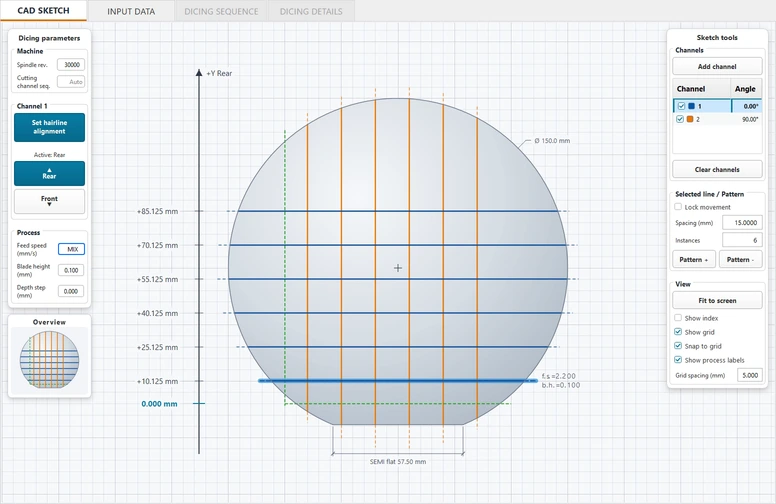
Geometry
Define the sample and hairline, then draw cut lines and repeat them into patterns for each channel.
The complete walkthrough
From layout and recipes to lab settings, materials, die maps and image exports.
English narration · 14 minutes, 55 seconds.
The video could not be loaded. Try the direct video link below.
Video hosted directly on diceflow.it. Privacy and cookies
Open videoDimensions and process parameters shown are examples, not recommended machine settings. Choose values for your sample, blade and equipment.
Get DICEFLOW
Evaluate the complete design and calculation workflow on your own Windows PC, with your own samples. The 15 days start at first launch.
DFD recipe export is part of DICEFLOW PRO and is enabled after we confirm compatibility with your machine. Trial, STANDARD and PRO compared in the FAQ.
Company and university email addresses receive the download link immediately. Other requests are reviewed by our team first.
One evaluation per organisation; additional requests are reviewed individually. Reinstalling does not restart the trial. Ask us about STANDARD for on-screen recipes and PRO for DFD export.
Prefer a guided introduction? Request a live session or write to info@diceflow.it.
Before you start
Trial access, machine compatibility and the way DICEFLOW fits into your workflow.
Another question? Ask our team.
DICEFLOW helps R&D teams, laboratories and prototyping services prepare dicing recipes on a separate Windows PC. It is particularly useful with manual and semi-automatic machines. Fully automatic machines may already provide similar functions: we check the value for your workflow before recommending a licence.
Tell us the manufacturer, exact model and what you want to do. We confirm feasibility before purchase. DFD export is model-dependent and is not guaranteed for every DISCO machine or another manufacturer's format. No customisation of the machine manufacturer's software is assumed.
Complete the request form. Requests from company and university email addresses receive the download link at once; other requests are reviewed by our team first. The trial starts at first launch and lasts 15 days; it includes CAD, tables, calculation and project saving, but not DFD recipe creation or export. Updating or reinstalling does not restart the evaluation.
We use them to assess compatibility, provide support and send the trial download link, which goes only to the address you enter. Company and university addresses receive it at once; for other addresses our team reviews the company and machine details first. We allow one evaluation per organisation and review additional requests individually. Your details are not used for unsolicited marketing.
STANDARD lets you design and calculate the recipe, review it on screen and transfer the settings manually to your machine. PRO adds DFD recipe export for a supported and verified machine configuration. Contact us for licence duration, workstation options and a quote.
Use a separate Windows PC to prepare the recipe. For a compatible PRO workflow, transfer the exported DFD file using the machine's normal import process, such as USB. We do not recommend installing third-party software on the machine-control PC.
No production recipe or remote machine connection is required for an initial enquiry or demonstration. Start with the machine model and a non-confidential description. If format validation needs an example, we will first agree a permitted, non-sensitive way to assess it. Do not send proprietary process data through the website.
Yes. Request a live session and tell us your machine, preferred date and time zone. An expert will reply to agree a time and joining details. The appointment is confirmed by our team, not automatically reserved by the form.
DICEFLOW is for dicing, not grinding. The displayed cutting times are estimates for planning, not guaranteed production cycle times. Alignment, handling and machine-specific operations can affect actual duration.
No. DICEFLOW is an independent product and is not affiliated with or endorsed by DISCO Corporation. Manufacturer and model names identify the equipment being discussed.
Let's check your workflow
Tell us the manufacturer and model. We will confirm what is feasible before you choose a licence.
Evaluate
Request a 15-day trial. With a company or university email address you receive your personal download link right away.
Request the trialMeet an expert
Suggest a date and time zone for a guided demonstration using non-confidential examples.
Request a live sessionPlan ahead
Discuss your machine, STANDARD or PRO, workstation needs and licence options with our team.
Contact the teamYou can also write to info@diceflow.it. Please include your machine manufacturer and model.